Notices from the ECM team
What the coloured box at the top of your pages is, and how to close it.
Now and then we put a notice at the top of your pages: a heads-up before maintenance, or some news about ECM.
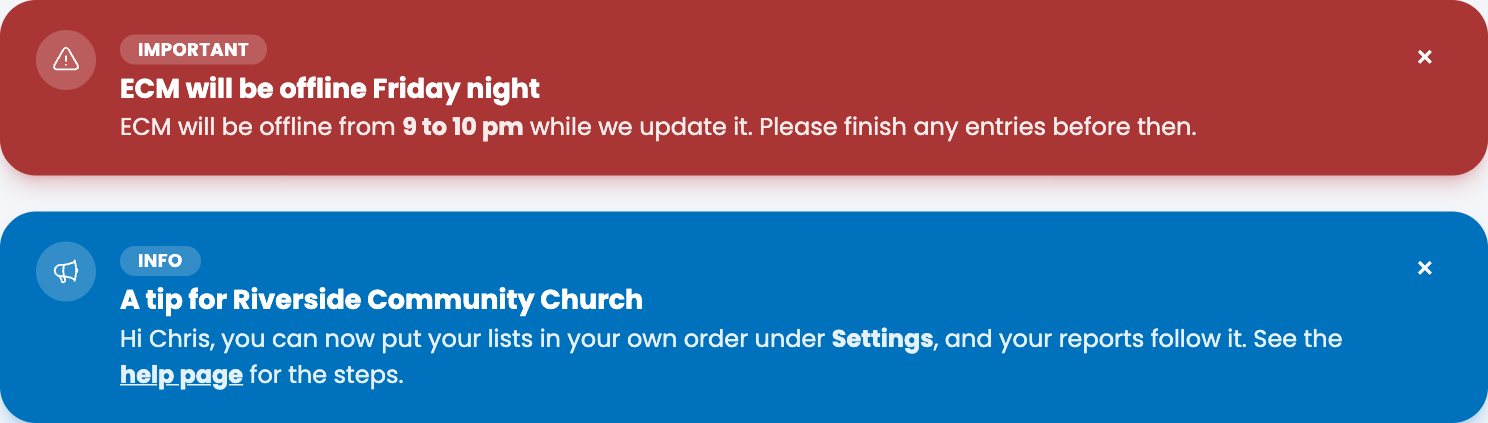
The two kinds
- Info (blue) is news or a tip. You can read it when you like.
- Important (red) is something to read before you carry on, such as a time when ECM will be offline for an update.
Close a notice
- Read the notice.
- Choose the × at its right.
It stays closed for you. Other people in your church still see it until they close it too, because each person closes their own. You can't bring a closed notice back, and nothing is lost: if you want to read it again, write to us on the Support page.
Good to know
- A notice also goes away by itself when we set it to end, so you don't have to close it.
- At most three notices show at once, newest first.
- If you or someone new joins your church while a notice is showing, they see it too.
- A notice may have a link (underlined, so you can spot it), to a help page or to something we want you to read. It may also have bold or italic words and a short list, and may use your name or your church's name. A link to another website opens in a new tab.
- A notice never asks for your password. If a message in ECM ever does, don't trust it, and tell us.
Spotted a mistake, or something that is not clear? Tell us.